Best Digital Microscope UK: A Practical Buying Guide
The best digital microscope depends on the task, not the largest advertised magnification. For coins and surface inspection, prioritise a stable stand, controlled lighting and clear image capture. For PCB soldering, choose enough working distance and usually stereo depth. Before buying, verify native resolution, connection type, UVC or app support, UK returns and the seller’s tested compatibility with your device.
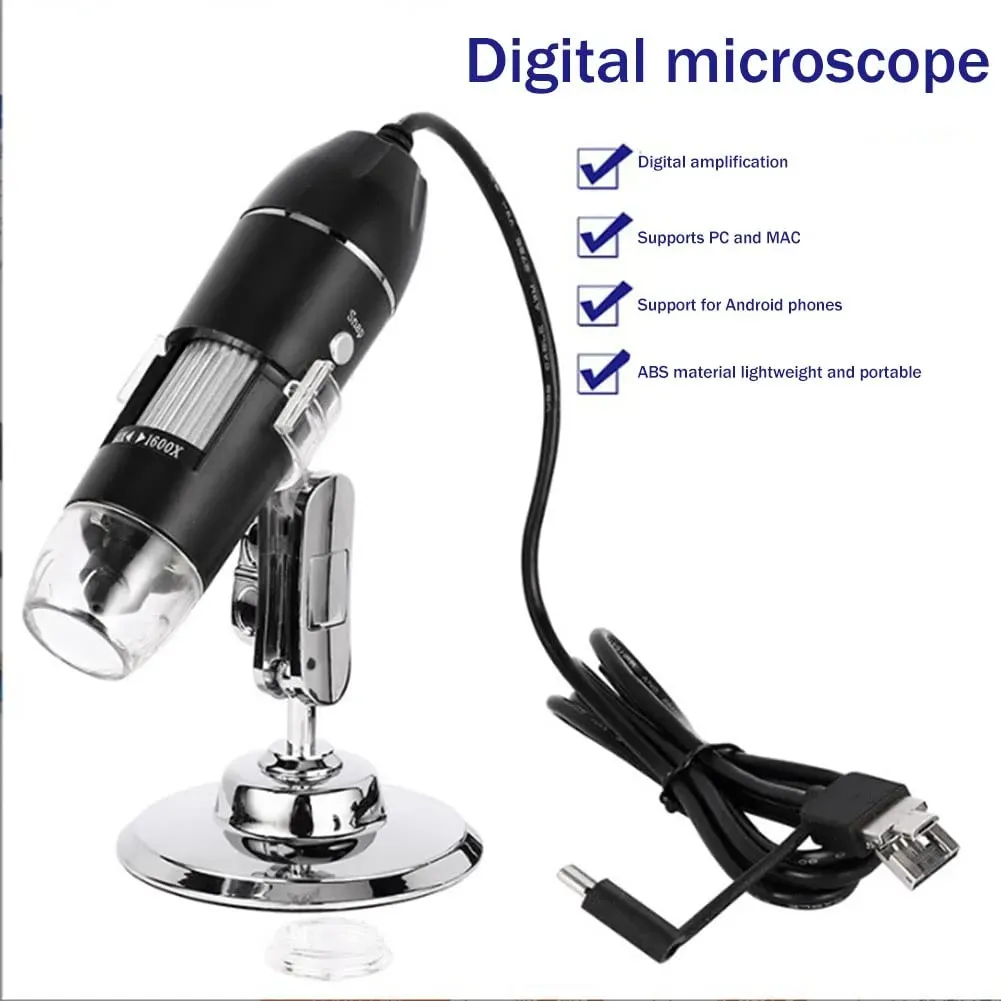
Editorial method and disclosure. This guide was materially reviewed on 19 July 2026. Jiusion UK has a commercial interest in microscope sales. No Jiusion model is named, compared or recommended because the exact stock identity, native output, stand geometry and device-compatibility evidence supplied for editorial review are incomplete. We did not buy or hands-on test the three external listing identities below, so they are not scored or ranked. “Best” here means the best-supported fit for a defined task.
The framework compares documented evidence rather than seller superlatives: intended task, specimen size, optical detail, field of view, working distance, stand stability, lighting, depth, display delay, capture path, software, operating-system support, calibration and UK purchase support. A specification counts only when it refers to the exact variant and explains how it was established.
Choose the task before the microscope
Start with what must be seen or manipulated. “Digital” describes a camera-and-display path; it does not remove the optics, and it does not tell you whether the system is designed for a flat circuit board, a whole coin or a prepared slide. For the deeper system-choice boundary, use the digital and direct-view optical microscope comparison.
| Task | Practical starting point | Evidence that decides |
|---|---|---|
| Coin details and catalogue photos | A camera-and-screen system can be convenient for recording detail. | Whole-object field, stand travel, glare control and unchanged sample files. See the coin microscope guide. |
| PCB surface inspection | USB, LCD, HDMI or stereo can work when the field and lighting match the board. | Surface-detail samples, side-light control, stable positioning and labelled capture. See the PCB inspection microscope guide. |
| Active PCB or SMD work | Direct-view stereo is usually the more practical starting category for hand control; a low-latency digital system needs device-level proof. | Depth, measured delay, tool and extraction clearance, field and stand rigidity. Use the active soldering microscope guide. |
| Prepared transparent slides | A compound microscope with transmitted illumination. | Objectives, condenser and illumination path, specimen preparation and camera attachment if capture is required. |
| Teaching, sharing and documentation | Built-in LCD, HDMI or a camera-equipped optical microscope may reduce crowding around eyepieces. | Viewing angle, screen visibility, capture/export workflow, controls, support and the actual teaching specimen. |
| Measurement | A system with a documented calibration and uncertainty method. | Reference standard, fixed optical setup, repeatability, software version and traceability. A ruler overlay alone is insufficient. |
Select the viewing architecture, then the connection
USB sends a camera feed to a host device and can make capture convenient, but it also makes the exact data path, operating system, permissions and app part of the purchase. HDMI can send a live feed directly to a display, although recording still depends on the system’s output and storage path. A built-in LCD is self-contained, but screen position, export and long-term support still matter. Direct-view stereo provides binocular depth without display delay in the optical viewing path. Compound systems serve prepared, transmitted-light specimens rather than general surface inspection.
Useful magnification is resolved detail, not a marketing figure
An advertised total such as 1000x is not enough to compare microscopes. The visible result depends on the optics, sensor sampling, native output, field of view, viewing size and any digital enlargement. Digital zoom can make captured pixels larger; it cannot restore detail that the optical image and sensor never recorded. The digital microscope definition and imaging guide explains those terms without turning them into a model ranking.
Ask for an original, uncropped still or video frame of a known target, taken at the field and working distance relevant to your task. The source should identify the exact variant, native file dimensions, frame rate for video, lighting and whether any resizing, sharpening or digital zoom was applied. A sharp close-up of a tiny crop does not prove that the same setup can frame a whole object or leave room for tools.
Evidence rule: compare the smallest feature that remains distinguishable in native output and the amount of surrounding context retained. Do not convert a seller’s magnification label into optical resolution, useful field or measurement accuracy.
Field of view, working distance, stand and lighting
| Check | Why it matters | Evidence to seek |
|---|---|---|
| Field of view | Determines whether you can orient the object as well as inspect a detail. | Width and height of a known target in the same setup as the sample image. |
| Working distance | Creates space for a coin holder, tweezers, a board fixture or other tools. | Lens-to-object clearance at the field you intend to use, not a single best-case number. |
| Stand geometry | Controls reach, drift, vibration and whether the base obstructs the work. | Base footprint, vertical and horizontal adjustment, clamp method and focus-drift demonstration. |
| Lighting | Reflective metal, dark boards and transparent slides need different illumination. | Independent intensity control, room for angled or diffused incident light, or transmitted light where the specimen requires it. |
| Focus control | A stiff focus action can move a light stand and lose the feature. | A continuous demonstration that includes focusing, releasing the control and capturing the result. |
There is no universal best field or working distance. A wide field helps with navigation and larger objects; a narrower field may show a smaller area in more detail. Decide which object must fit, what must move beneath the lens and where extra lighting must sit. Then compare systems at that exact geometry.
Latency, depth and the display
For observation and still capture, modest display delay may not change the task. During active hand work, delay, uneven frame pacing and a flat image can make tool placement harder. Do not assume every digital system has the same lag: ask for a measured method or try the exact display chain. A direct-view stereo optical path offers natural binocular depth and no camera-to-screen delay, while camera-equipped stereo systems can add capture without giving up direct viewing.
Accessibility and ergonomic fit
A screen can support shared viewing, a larger image and a more flexible viewing position, but it is not automatically accessible or ergonomic. Check screen angle and height, glare, contrast, text and control size, colour-independent status cues, keyboard or remote capture, left- and right-handed reach, stand adjustment and whether the app supports the user’s display settings. For longer sessions, arrange the viewing position and task changes using the UK Health and Safety Executive’s display-screen posture guidance; assess the complete workstation rather than one device claim.
Capture, software and operating-system preflight
Compatibility must be tied to an exact microscope, connector or adapter, host device, operating-system version and named app. The USB-IF cable and connector guidance makes clear that USB cables and connectors do not all provide the same capabilities. A plug that fits therefore does not prove a data path, host mode, video support or application support.
- 1. Identify the exact variant. Match the label, package, manual and seller option; do not transfer a support matrix from a similar model.
- 2. Trace the complete data path. Record the supplied connector, every adapter or hub and whether each link carries data rather than charge only.
- 3. Check the video class and driver boundary. Microsoft documents a system UVC driver for conforming devices in its USB Video Class overview, but that class-level fact does not prove a particular microscope is UVC.
- 4. Require a dated platform record. Apple explains how apps select an external camera on macOS. Android requires USB host capability and permission, while an external camera also depends on the device build and app; see the official Android USB host and AOSP external-camera documentation.
- 5. Verify capture, not only live view. Ask which app saves stills and video, the native file dimensions and frame rate, and whether hardware buttons require model-specific software.
- 6. Check support provenance. Prefer a named publisher, official store or operating-system app, with version, update date and a support contact. Do not disable security protections for an unidentified download.
For app choice, permissions, source selection and symptom-led troubleshooting, use the retained guide to check digital microscope software compatibility. For stand placement, distance, focus, lighting and capture technique, use the separate USB microscope operation guide.
Calibration and measurement limits
A software ruler is not proof of calibrated measurement. Calibration must use a suitable reference at the same optical setting, working distance, image resolution and processing path as the object. Refocusing, moving the camera, changing a lens or applying digital zoom can invalidate the scale. If a dimension matters to acceptance or safety, require a documented calibration procedure, repeatability result, uncertainty and traceability appropriate to the work.
Inspection and active work are different purchases
Inspection means observing a stationary surface, comparing areas and recording images. It prioritises field, lighting, stable capture and enough detail for the visible feature. It cannot establish hidden joints, electrical continuity or root cause. Active work adds depth judgement, immediate feedback, tool clearance, posture and workspace constraints. A device described for inspection should not be promoted for hands-on rework unless the exact stand, latency and clearance have been demonstrated.
UK purchase, return and support evidence
The retiring UK checklist contributes useful questions, not facts about any current seller. Before ordering, capture the exact model or variant, the GBP total, VAT basis, unavoidable delivery charge, dispatch estimate and delivery estimate. Dispatch is when the seller sends the parcel; it is not the same as arrival. Confirm the trader identity, a working contact route and who owns technical support.
Read the cancellation, return, faulty-goods and refund information before paying. It should state the process, address, timing, eligibility or exceptions, postage responsibility, refund method and who provides any voluntary warranty. The official GOV.UK distance-selling guidance and GOV.UK returns and refunds guidance are authoritative starting points; the seller’s published terms and the facts of the transaction still need to be checked. Save the product description, terms and order confirmation shown at purchase.
| Decision | Minimum record | Red flag |
|---|---|---|
| Identity | Exact variant, label or model reference and dated manual. | One page mixes several names or specifications. |
| Task fit | Native sample, target, field, working distance, stand and lighting method. | Only a magnification badge or enlarged marketing image. |
| Compatibility | Exact host, OS version, app, connector path and test date. | Support inferred from “USB-C”, “Mac”, “Android” or “OTG” alone. |
| Price and delivery | Checkout total, VAT basis, mandatory delivery and separate dispatch/delivery information. | A headline item price without unavoidable charges. |
| Returns and support | Visible terms, contact, process, address, postage rule, refund information and warranty provider. | A badge or duration with no accessible terms. |
Low-cost microscopes: use an evidence gate, not a price badge
A low-cost camera microscope can be worth considering for bounded surface-observation and capture tasks, but price does not prove image detail, stand usability or compatibility. For an under-£50 shortlist, include mandatory delivery and VAT in the threshold, use the same target and lighting for every sample, and compare native output, field, working distance, stand, connection, software and returns under the same definitions.
Three exact listing identities were recorded during the 19 July 2026 evidence review. They are shown only to make the research set reproducible; they are not recommendations, availability claims or tested winners.
| Listing identity | Direct source recorded | Why it is not ranked here |
|---|---|---|
AmScope UTP200X003MP-3PL | AmScope UK model page, observed 19 July 2026. | No common original sample, hands-on result or complete uniform field set. |
K&F Concept GW45.0028 DM101 | K&F Concept UK model page, observed 19 July 2026. | The captured VAT and possible customs basis did not support a clean delivered-price conclusion. |
Bresser Youngster ExplorerLens, article 15152 | Bresser UK model page, observed 19 July 2026. | The mandatory delivery amount was not established and no common sample was available. |
A defensible winner would require current purchasability, a timestamped total delivered price, exact variants, common original samples, sourced fields, disclosed inclusion rules and repeatable results. That evidence is incomplete, so this guide publishes no winner, star score or “tested” claim.
A 30-minute receipt check before relying on the microscope
- 1. Match identity and contents. Compare the delivered label, variant and included items with the order record; photograph discrepancies.
- 2. Confirm the data path. Use the documented connection and app, record the detected camera name and do not assume an adapter is data-capable.
- 3. Frame the real task. Place the intended object or a representative target under the stand and confirm both overview and detail are reachable.
- 4. Check focus and stability. Focus, release the control and watch for drift. Capture in software so touching the device does not mask stand movement.
- 5. Test lighting. Reduce intensity and change light direction on reflective areas; confirm detail remains visible without clipped highlights.
- 6. Save native files. Record still and video file dimensions, frame rate where available, app, OS, working distance and whether any digital zoom was used.
- 7. Recheck the purchase terms. If the exact task or documented compatibility fails, preserve the evidence and follow the seller’s published contact and return process within its stated terms.
Frequently asked questions
What magnification do I need?
Use the lowest magnification that reveals the feature while retaining enough field of view to orient the object. An advertised total such as 1000x does not show how much optical detail the system resolves. Compare uncropped samples, native capture output, field of view and the setup used, then judge the result against your own task.
Is USB, HDMI or LCD better?
None is universally better. USB suits capture through a computer when the exact camera, port, operating system and app are documented. HDMI can separate viewing from computer software, while a built-in LCD can make a self-contained setup. Compare image delay, capture options, screen position and support, not the connector label alone.
Will it work with my phone or Mac?
Only an exact model-and-device compatibility record can answer that. Connector shape is not proof of a data path, USB host support, UVC support or app compatibility. Check the microscope model, supplied adapter, phone or Mac model, operating-system version and named app, then look for a dated test or a return route if the combination fails.
Is it suitable for coins or soldering?
A camera-and-screen microscope can suit coin detail capture and surface inspection when its field, stand and lighting fit the object. Active soldering is a different task: depth perception, immediate visual feedback and tool clearance become critical, so a direct-view stereo microscope is often the more practical starting point. Do not infer either use from magnification alone.
What resolution, working distance and stand should I check?
Ask for native still and video output, uncropped samples, field of view at the intended setup, usable lens-to-object clearance and the stand’s adjustment range. Check whether focus causes drift or vibration and whether the base reaches the work area. Seller labels are not substitutes for a consistent sample and measurement method.
Are 1000x claims meaningful?
Not by themselves. A large displayed figure can combine optical enlargement, sensor sampling, screen size and digital zoom, while digital zoom cannot recover detail the optics and sensor did not capture. Treat the claim as incomplete unless the seller defines the method and supplies native, uncropped output with a scale or known target.
What should UK returns and warranty information state?
Before ordering, look for the trader’s identity and contact details, total price including unavoidable charges, delivery arrangements, cancellation and return process, return address and postage responsibility, refund method and timing, exceptions, and who provides any warranty. Keep a copy of the terms shown at purchase and distinguish a voluntary warranty from statutory rights.
Can a digital microscope measure accurately?
Software rulers are not automatically accurate. Measurement needs calibration with a suitable reference at the same optical setting, working distance and image path used for the object. Refocusing, zooming or changing resolution can invalidate that calibration. For measurement-critical work, require a documented method, uncertainty and traceability rather than a screenshot of a ruler tool.
Sources and further task guides
The selection principles above use direct documentation from Evident on digital-microscope imaging, Leica Microsystems on digital microscopy and depth, USB-IF, Microsoft, Apple, Android/AOSP, GOV.UK and HSE. Seller listings were used only for the dated candidate identities shown above, not as independent proof of performance.
Continue with the specialist owner for the task: coin observation and cataloguing, surface-visible PCB inspection, active soldering choice and setup, software and OS checks, or physical USB operation. Those pages own the detailed workflows; this page remains the UK selection framework.